
Tip: Start typing in the input box for immediate search results.
-
SETUP
-
WORKFLOWS
-
- Path for DEMOing BruceBEM
- Demo - Value Proposition (Reports)
- Demo - LogIn and Home Page
- Demo - Interoperability
- Demo - Adaptive UI & Access
- Demo - Collaboration
- Demo - Assets Management
- Demo - Service Contracts
- Demo - Portfolio Management and Rentals
- Demo - Contracts
- Demo - Processes & Service Catalogue
- Demo - PM (Preventive Maintenance)
- Demo - Grouping Assets (Places & Equipment) - SYSTEMS & PM GROUPS
- Demo - Billing - Service & Rental Invoices
- Demo - Costs & Prices
- Demo - Meters & IoT Sensors
- Demo - SLAs (Service Level Agreements)
- Demo - Resources & Performance
- Demo - Dashboards, Reporting & Analytics
- Show Remaining Articles ( 4 ) Collapse Articles
-
WORKING-WITH
2. Services Categories (setup)
In BruceBEM, Service Categories help organize and classify different types of services offered or managed within the system. These categories ensure that tasks, work orders, and subcontractor assignments are structured based on specific service types, such as maintenance, cleaning, technical support, or inspections. By categorizing services, BruceBEM enhances efficiency, simplifies tracking, and improves workflow management across various operations
Step:1: Navigation
Background Data –> Service Categories
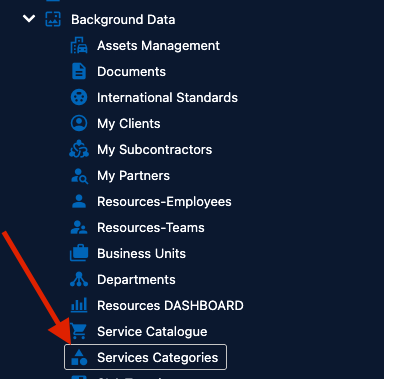
Step 2: Create the service category
In the service categories screen click “New”
And in the pop enter the service category name and selct a color to be associated with the category.
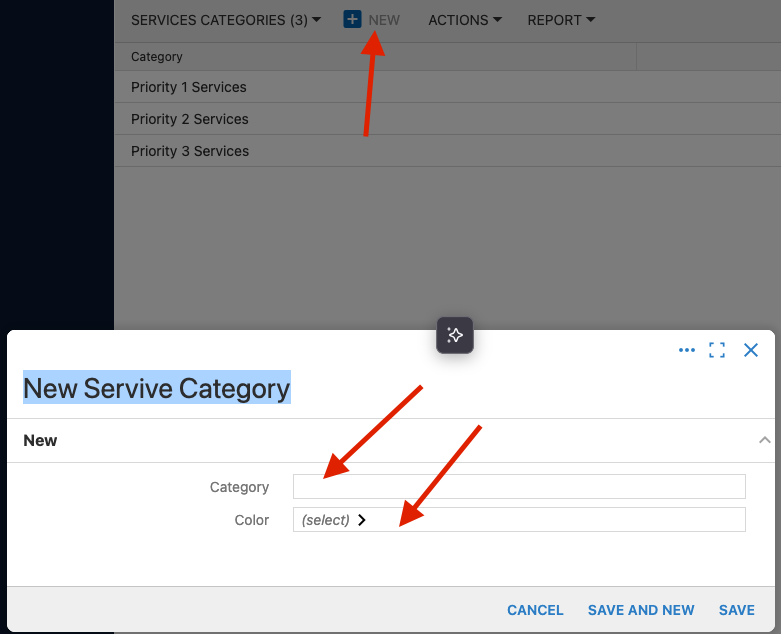
Then click “Save” to create